 Web
Web The notary office’s public website
Your website, your name, your address — and you change it by talking
Web is your notary office’s page on the internet: your own address, the four co-official languages, complete from day one. Setting it up and keeping it running is on us. You create it by answering an assistant that builds it in front of you —or by copying the site you already have— and from then on there is no program to learn: you tell MycoBot what to change, see how it would look before anyone else does, and publish when you are convinced. And depending on what else you have, your site stops being a brochure and starts attending.

Built in front of you
A few questions, and the site takes shape as you watch
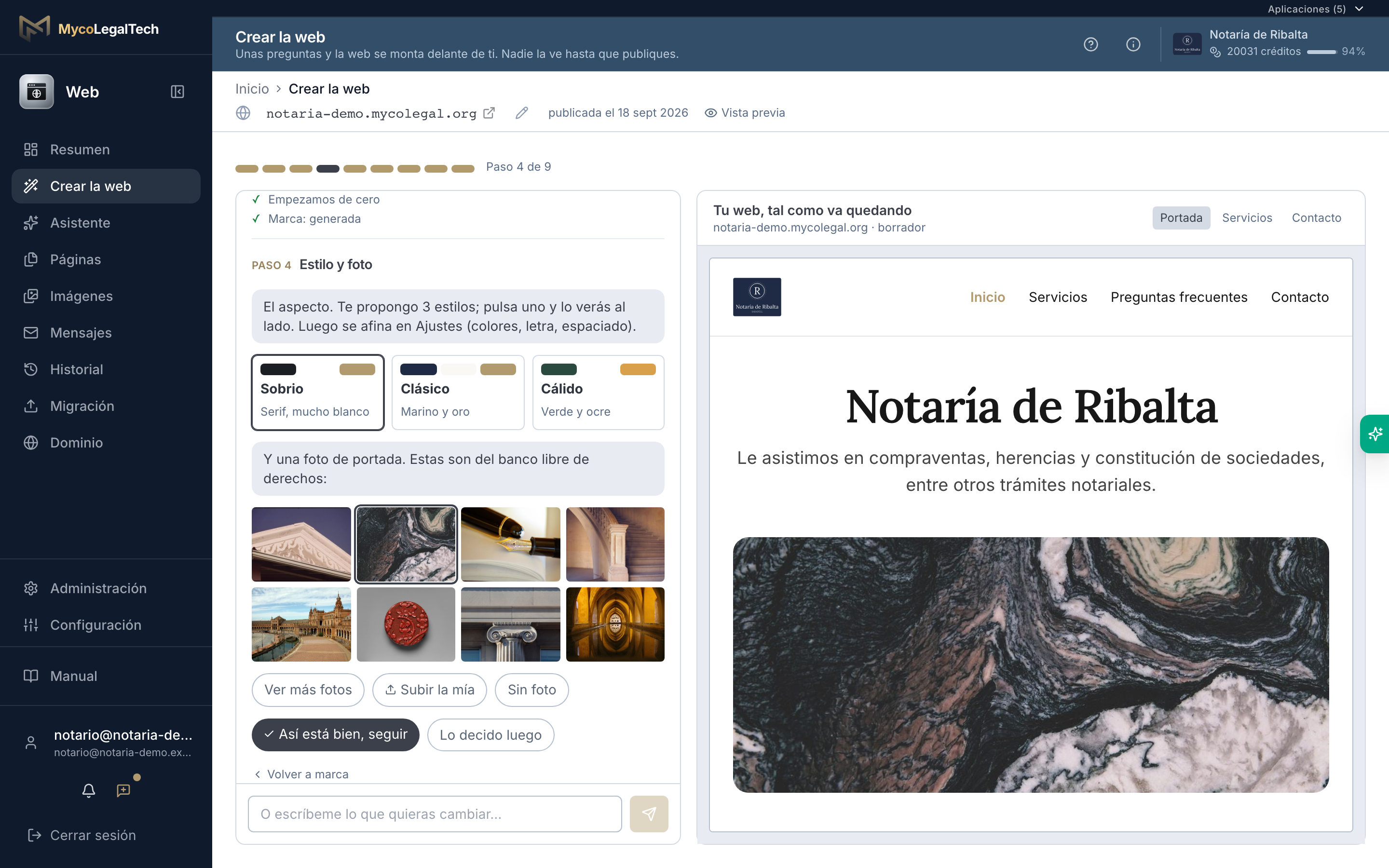
The first time you come in, an assistant walks you through nine steps: confirm what we already know about your office, say whether you have a site, pick a mark, a style and a photo, tell us what you do and how you attend. On the right, your site changes with every answer. Nobody sees it until you publish, and in minutes it is live.
- There is always something to click: never a blank field in front of you. And “decide later” at every step
- Already have a site? Texts, photos and even the logo come along, and the old addresses keep working
- You tick procedures and the site builds the services, the FAQs and what paperwork to bring for each
- You can go back to any step: changing the style does not touch the services
- What you do not say is not written: no invented hours, years of experience or prices
Changed by talking
You ask for the change in words; publishing is your call
You write what you want changed and the assistant prepares a proposal: the exact list of what it touches and a preview of how your site would look. Nothing publishes itself. Accepting saves it to your draft, and publishing is a separate step you take.
- The AI can only touch sections that exist, with the options foreseen: it cannot break your layout or slip anything odd in
- The screen always shows your site: with no proposal, as it is now; with one, how it would look
- The list of changes is computed by comparing before and after — it is not the AI telling you what it did
- Looks change by talking too: the cover, the type, how much the page breathes, and your colors
- Every publication is kept: you see what changed, when, and go back with one click

Sections
Content that maintains itself
The sections cover what a notary office needs —cover, services, team, where we are, gallery, FAQs and contact— and two of them no notary website can have on its own: the paperwork needed for each procedure, and the latest resolutions from the Directorate-General. Nobody writes either one: they keep themselves current.
- What paperwork is needed: you pick the procedures and the list updates from the MycoLegal catalog — and each procedure is one more page people find you by
- Latest resolutions: DGSJFP (BOE) or DGDEJ, linked to the original — new content on your site with nothing to write
- Procedures portal: a band leading to your requests portal, shown only if you have it open
- Where we are: the address comes from the office record and “Get directions” is always at hand, without calling Google or anyone — which is why your site asks nobody to accept cookies
- Every text in the four languages: you switch with a tab, without keeping four websites

Images
Photos you can use without asking permission
A notary website without a single photo does not get published, and waiting until you have your own is the surest way never to launch it. Web ships with a licensed image collection —architecture, documents, city and textures— ready to drop into any section. When you have your own, you upload them and they take over.
- No people and no interiors that look like your office: they accompany, they do not pretend to be your premises or your team
- Never AI-invented photos of an office or of people who do not exist
- Your own are kept in your Network Drive, like any other office document
- If we copy your previous site, its photos come along — with a reminder to check whose they are

Your address on the internet
Go live today, put your own address on it whenever you like
The site is born with a MycoLegal address that works from minute one and never expires. When you have your own —something like notaryexample.es, bought by you, from whoever you like, and still yours if you ever leave— you tell us and we hand you, in writing, what your provider has to do. The old address does not go dark: it keeps leading to the new one.
- Hosting, the security padlock and renewals included: nothing to administer
- The address is yours, not ours: always in your name, and it leaves with you
- Do not have one? We tell you which are free and what they really cost, and register it for you if you want
- Changing address does not break links already out there: the old one leads to the new
- We watch it daily: if it stops responding or the security padlock expires, you hear it from us before a client tells you
- Coming from another site? We copy your pages and set the old addresses to lead to the new ones, so you keep the visits you already have

The three tiers
Be there, attend, serve
Web comes in three tiers, and you do not pick them from a list: they follow from what you already have. Each app in the ecosystem adds one more thing your site can do for whoever arrives — and switching it on is your decision, from settings.
Web Presencia
Web alone
Be there: your full website, yours and up to date.
- Cover, services, team, where we are, FAQs and contact
- Changes are asked for in words, and you publish them
- Your own address, four languages, legal texts kept current, and ready to be found on Google
- No logo? We propose a mark built from the name, with 72 variants to fine-tune it
- What people write in the form reaches the office’s inbox
Web Recepción
Web + Consultor
Attend: an assistant answers whoever arrives, using what you published.
- The assistant answers with what your site says; it sees no case files or office data
- To “what paperwork do I need?” it answers for any procedure with your office’s list, separating the usual from what depends on the case — and never makes it up
- When a question needs a person, it drafts the email to the office and sends it once the visitor confirms
- It shows nothing you have not published, and needs access to nothing
- With a cap per visitor and per day: nobody can run up your usage by asking
- Having Consultor makes it possible; switching it on is your call, and it ships off
Web Clientes
Web + Consultor + Notaria + Peticiones + Tramitación
Serve: the visitor stops being a stranger and sees what is theirs.
- Appointment requests: the visitor says what they need and when suits them, and the office confirms from its diary
- Free slots never reach the street: it is a request for an appointment, not a booking
- What people send you stops ending up in an inbox and enters the Portal as a request
- “Client access”, in the header and footer, leads to your Portal: clients see their file and their appointment without calling
- No open sign-up: you invite the client, and the site never registers anyone on its own
What you have is what makes each function possible; switching it on is your decision. Without Peticiones or Tramitación the public form still works —it reaches the office by email—: what changes is where it lands. And without Consultor or Notaria, that function does not even appear in settings.
And more
Everything is kept
Every publication is kept whole: you see what changed and when, and you can go back to how it was.
Photos to start with
A ready-made image collection to start with, and your own when you have them. Of the office or the team, never photos invented by an AI.
Nothing gets lost
What people write from the site lands in its own inbox, not a shared one where nobody knows who replies.
We copy your current site
We read the one you have and bring it over with its pages, photos and logo, keeping the old addresses working. If you have none, the assistant builds it with you in minutes.
So they find you
Each page with its title and summary, your languages properly linked to each other, and the office details —address, hours and phone— just as Google expects them to show you in local searches.
Legal texts kept current
Legal notice, privacy and cookies written with your office’s details and kept current by the system itself: never copied from the old site, never left out of date.
A logo, if you have none
Three proposals to start and 72 variants to fine-tune, built from the office’s name, in a file that stays sharp at any size —from letterhead to a poster— and takes your site’s colors. A decent mark while you have no logo; it does not aim to replace a designer.
It looks like you, not like us
Cover, type, spacing and background combine in 243 ways, plus your two colors. No office has to look like the one next door — and it all changes by talking.
No cookie notice
Your site uses no cookies and loads nothing from other companies, so nobody has to accept a notice just to read you.
Fast at any hour
Pages are always ready and refresh themselves on publish, and photos are served light. Your site opens as fast at eleven in the morning as at three at night.
Email in your name
What the site sends can go out from your own email address, set up so it reaches the inbox and not the spam folder.
Clear division of roles
The notary office is the data controller and MycoLegal the processor. With the assistant on, the privacy notice says so and explains how long conversations are kept.
Your notary office, also where people look for it
Launch your website and let it grow with you: what you add from the ecosystem shows up in what your site can do for whoever arrives.